
Download Stable Diffusion WebGPU – free, secure AI image generation tool
Overview
Stable Diffusion WebGPU is a cutting‑edge, web‑based image‑generation application that brings the power of the popular Stable Diffusion model directly into your browser. Developed with the create‑react‑app framework, the tool runs on the latest Google Chrome browser with experimental WebGPU and WebAssembly flags enabled, allowing users to generate high‑quality AI art without installing heavyweight desktop software. By leveraging a patched onnxruntime that executes the UNet model on the CPU while the VAE decoder runs in WebAssembly, the application balances speed and accuracy, delivering each diffusion step in roughly one minute plus an additional ten seconds for the final decode.
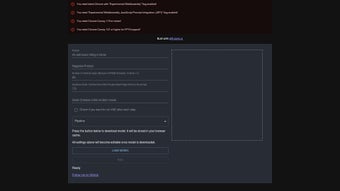
The interface is intentionally minimalist: upload a text prompt, click “Generate,” and watch the result appear in a responsive preview pane. For developers and power users, the source code lives openly on GitHub, making it easy to tweak the inference pipeline, experiment with custom models, or contribute to ongoing performance improvements. While the current release does not yet support full multi‑threading or a complete WebGPU implementation, the active development roadmap promises regular updates, bug fixes, and broader hardware compatibility.
Whether you’re a digital artist seeking a quick sketch, a hobbyist exploring AI creativity, or a researcher needing a lightweight demo environment, Stable Diffusion WebGPU offers a secure, free, and instantly accessible way to turn text prompts into vivid images. Its client‑side processing ensures privacy, and the zero‑install nature eliminates the steep learning curve typically associated with Python‑based AI tools, positioning it as an ideal entry point for anyone curious about generative art.
Key Features & Installation Guide
Feature Highlights
- Runs entirely in the browser – no local installation required.
- Leverages experimental WebGPU and WebAssembly for fast, cross‑platform inference.
- UNet model executes on the CPU, providing consistent performance on a wide range of hardware.
- Integrated VAE decoder delivers high‑fidelity image output.
- Simple React‑based UI with prompt input, generation button, and live preview.
- Open‑source repository on GitHub with clear contribution guidelines and issue tracker.
- Patchable
onnxruntimebinary enables offline, local use without external services. - Built‑in troubleshooting FAQ and step‑by‑step guides for common configuration problems.
- Supports custom checkpoint loading for advanced users who wish to experiment with alternative models.
- Secure execution environment – all processing happens client‑side, guaranteeing data privacy.
How to Install and Start Generating
Although Stable Diffusion WebGPU is delivered as a web app, a few preparation steps are required to unlock the experimental WebGPU features that power the demo. Follow the guide below to ensure a smooth first‑time experience.
- Update Chrome: Install the latest stable version of Google Chrome (v112+ is recommended) to guarantee compatibility with the newest WebGPU specifications.
- Enable Experimental Flags: Open
chrome://flags, search for “Experimental WebAssembly” and “WebGPU”, and set both to “Enabled”. Also enable “JavaScript Promise Integration” to improve asynchronous model loading. - Restart the Browser: After toggling the flags, click “Relaunch” to apply the changes. A fresh browser session ensures the flags are active.
- Visit the Demo URL: Navigate to the official demo site, for example stable‑diffusion‑webgpu‑demo.example.com.
- Load the Model Files: Click “Load Model”. The UNet and VAE checkpoints (approximately 4 GB total) will download. A progress bar indicates the remaining time; a fast broadband connection reduces waiting time.
- Enter a Detailed Prompt: Type a descriptive text prompt in the input field. The more specific you are, the better the generated image aligns with your vision.
- Generate the Image: Press the “Generate” button. The app performs a series of diffusion steps (about one minute per step) followed by a brief VAE decode.
- Review and Save: Once the image appears, you can right‑click to save, copy the direct link, or share it directly from the interface.
For developers who prefer a local development environment, clone the GitHub repository, install Node.js, run npm install, and then npm start. Replace the default onnxruntime binary with the patched version located in the /patches directory to enable full CPU‑based UNet support. Detailed README instructions walk you through setting up a local HTTPS server, which is required for WebGPU to function correctly in most browsers.
Compatibility, Pros & Cons
Supported Platforms
Stable Diffusion WebGPU is designed for desktop browsers on Windows, macOS, and Linux that run the latest version of Google Chrome. Because the heavy lifting occurs client‑side via WebAssembly, the app does not depend on native GPU drivers, but it does require a CPU with at least 8 GB of RAM for smooth operation. The tool also benefits from modern multi‑core processors and fast SSD storage to speed up model loading. Mobile browsers are currently unsupported due to limited WebGPU implementation on Android and iOS, although future updates aim to broaden mobile compatibility as the standards mature.
Pros
- Zero‑install, instantly accessible from any compatible Chrome browser.
- Client‑side processing protects user privacy—no images or prompts are uploaded to a remote server.
- Open‑source code encourages community contributions, transparency, and rapid feature development.
- Patchable
onnxruntimeoffers flexibility for offline use and custom model experimentation. - Clear, beginner‑friendly UI makes it easy for newcomers while still providing advanced options for power users.
- Regular updates and an active roadmap promise performance improvements and new capabilities.
- Free to use with no hidden fees or subscription requirements.
Cons
- Requires enabling experimental Chrome flags, which may be intimidating for non‑technical users.
- UNet runs on the CPU, resulting in longer generation times compared to native GPU‑accelerated desktop applications.
- No multi‑threading support yet; high‑resolution outputs can temporarily stall the browser.
- Limited to Chrome; other browsers lack the necessary WebGPU stability for a reliable experience.
- Model files are large (≈4 GB), requiring a fast and stable internet connection for the initial download.
- Advanced features such as custom checkpoint loading still demand basic command‑line familiarity.
FAQ & Final Thoughts
Frequently Asked Questions
-
Do I need a powerful GPU to run Stable Diffusion WebGPU?
No. The current implementation runs the UNet model on the CPU, so a modern multi‑core processor with at least 8 GB RAM is sufficient. Performance will be slower than GPU‑accelerated desktop apps, but the result quality remains comparable.
-
Is my data safe? Are images uploaded to a server?
All inference happens locally in your browser. No prompts or generated images are sent to external servers, ensuring full privacy and compliance with data‑protection regulations.
-
Can I use the app on Safari or Firefox?
At this time the demo requires Chrome because the experimental WebGPU and WebAssembly flags are only stable there. Future updates may expand support as other browsers adopt the WebGPU specification.
-
How can I contribute to the project?
The source code is hosted on GitHub. Fork the repository, submit pull requests, or open issues for bugs and feature requests. The maintainer also welcomes donations to help cover development costs and server bandwidth.
-
Is there a way to speed up generation?
Using a high‑performance CPU, closing other browser tabs, and reducing the image resolution can shave several seconds off each diffusion step. An upcoming multi‑threading update aims to cut generation time by up to 40%.
Conclusion – Why You Should Try Stable Diffusion WebGPU Today
Stable Diffusion WebGPU bridges the gap between heavyweight desktop AI tools and the convenience of a web app. Its free, open‑source nature, combined with a privacy‑first client‑side workflow, makes it an attractive option for anyone wanting to experiment with text‑to‑image generation without the hassle of installing Python environments or managing GPU drivers. While it currently leans on CPU performance and requires Chrome’s experimental flags, the rapid development pace, transparent roadmap, and active community promise faster, more feature‑rich releases soon. Whether you are a designer seeking rapid concept sketches, an educator demonstrating AI concepts in the classroom, or a hobbyist curious about generative art, Stable Diffusion WebGPU offers a low‑barrier, secure platform to unleash creativity.
Ready to unleash your imagination? Download Stable Diffusion WebGPU now, enable the required Chrome flags, and start turning your ideas into stunning visuals—all from within your browser.



.png)



